How Present works.

1 · Capture and verification

You shouldn't have to trust us when the post itself can carry evidence of where it came from.

Capture

The camera is the only door

The only way to post is the in-app camera. No gallery access, no importing, no way in, today, for a post that already exists.

Sign

Sealed at the moment it happens

The instant you capture something, your phone's secure hardware signs it, confirming a real capture on a real, untampered device, before the image ever leaves your hand.

Post

No edits

Caption it, then post it or bin it. What posts is exactly what the camera saw. No filters, no edits, no AI.

Share

Proof that travels

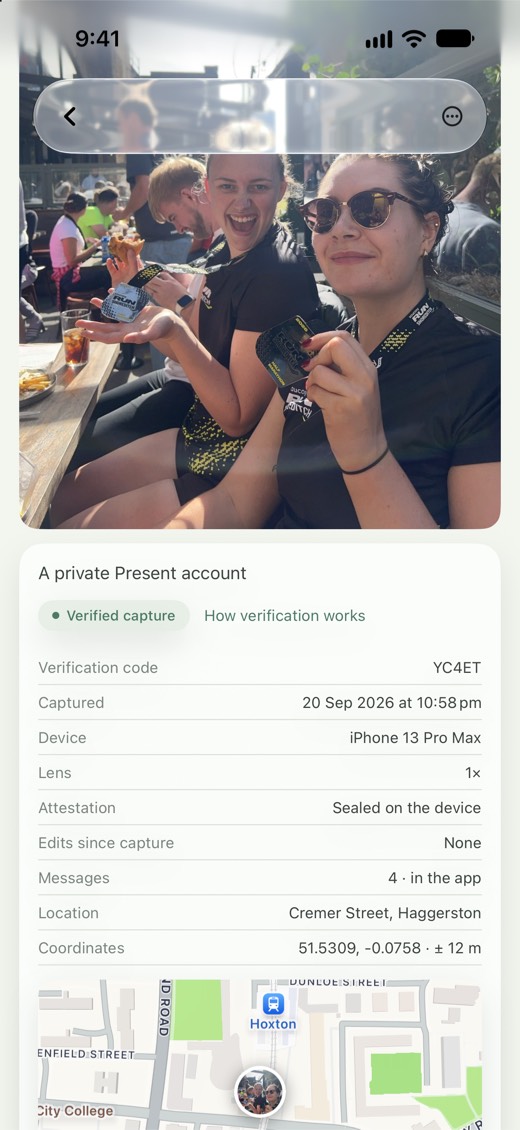
Every post gets a permanent page anyone can visit: the post, its capture time, its attestation. Share the link and the proof goes with it.

Can't someone just photograph a screen? +

Yes, they can. Present verifies capture, not context. A real photo or video of a screen is still a real capture. Present scans every post for abnormalities, and if anything looks out of the ordinary it's flagged in the app and the verification page so you can judge for yourself. We also reject images with too much text.

What happens if verification is ever broken? +

We tell you. Publicly, immediately, with the affected records marked.

Can I write captions? +

Every post gets one. 140 characters, typed in the app. No paste, for the same reason there is no import: what you post here, you made.

2 · The record page

Every post has a home.

Screenshots lose their history. So proof on Present doesn't live in the file. It lives at the link. A page anyone can open, no account needed, showing the post and its record: when it was captured, on real hardware, untouched since.

prsnt.au/7TR2N · verified
What happens if I delete a photo? +

It's gone. The link resolves to a simple notice that the post was deleted, nothing else, nothing tied back to the account.


3 · Honest about the limits

What we prove, and what we don't.

Present proves

A post was captured live, on real camera hardware, and has never been altered since. Anyone can check that at the link, without an account.

Present doesn't prove

That the scene itself tells the whole story. A real photo or video of a staged moment still verifies, because it really was captured. We verify capture, not context.

4 · Profiles

Your profile photo is taken in the app.

The selfie camera, live, at the moment you set it. Attested like any other capture, so a profile photo here can't be generated, stolen, or borrowed from someone's feed. And like every capture on Present, it has its own record page anyone can open.

The rest of a profile is made up of the posts you make and the posts your friends make of you. If you photograph a friend, they can accept the post and it becomes part of their profile too.

Which means you can capture something just for someone else. Tag them and, if you're not in it yourself, you can keep it off your own profile. It still lands on theirs and reaches their friends, still credited to you, and you still get the replies. Nobody has to hand over their phone.

Names here are just names. You go by your first name, or whatever your friends actually call you, because everyone who can see you already knows you. Usernames exist for search and links, and that's all they're for.

Profile photo of @brian, captured live on the selfie camera

Brian

@brian

iPhone 12 mini · 4:38 PM AEST · 15 Sep 2026
Location not shared

view photo record

5 · Connections

Both ways, or not at all.

Can I follow someone without them connecting back? +

No. Connections go both ways or not at all.

Who can see who I'm connected to? +

Public accounts have a viewable connections list. Private accounts don't, and they're also left out of every other list, so being private means nobody can map who you know. The one exception is mutual connections: if someone is connected to both you and the person viewing, they'll show, because the viewer already knows them.

What if I don't want to be connected to someone any more? +

Disconnect, any time. It ends the connection for both of you, and they aren't told. They'll see your profile the way anyone else does, with a button to connect again if they want to, and you can ignore that. If you need something firmer than that, block them.

7 · Tags

Photos of you, decided by you.

If everything I post is taken by me, how do photos of me get on my profile? +

Your friends put them there. When a friend tags you in a post, it lands on your profile once you accept it, taken by them, verified like everything else. There is no separate section for posts you're tagged in, they sit with your own. The photos of you here were taken by the people you were actually with.

Can I take a photo just for someone else? +

Yes. Take it, tag them, and if you're not in it you can hide it from your own profile. It lives on theirs and reaches their friends, with you credited as the photographer and getting the replies. Most people leave it on their own profile, but the option is there.

What if the photo is of my friends? +

Tag them and, once they accept, the photo lives on their profile and shows in their friends' feeds, with you credited as the photographer. If you're in it too, it lives on yours as well. If you're not in it, it lands on your profile too by default, and you can choose to hide it there so it goes only to them. Half the photos of you were taken by someone else; that's how profiles fill up here. Since every photo is captured live, the photos of you are taken by the people you're actually with.

8 · The map and location

Location, kept simple.

Location, kept simple

  • approxThe default. The area a photo was taken in, shown at its centre. Your exact position never leaves your phone.
  • preciseYour exact position, only when you choose it, for that one photo.
  • noneNothing about where you were is saved, and the photo stays off the map.
Do you use my location? +

Only at the moment you shoot, and only while the app is open. Your exact position stays on your phone unless you choose Precise for a photo. Otherwise Present shares an approximate area, or nothing at all.

9 · Notifications

Batched, on your schedule.

Max one per day, by default. More often if you choose.
If nothing happened, nothing gets sent. Pick how often you want to hear from us, and which kinds of things count.

Notifications

How often

Immediately
Every few hours
Twice a day
Once a day
None

Notifications come batched, and only as often as you'd like.

You'll only hear from us when there's something to say. This just controls how often we check.

By type

Connection requests
Replies on your photos
Replies on posts you've replied to
Tags

notification settings

How do notifications work? +

Batched, on your schedule. Pick how often you want to hear from us, and we'll bundle everything into one check-in. Quiet day, no notification at all.

10 · Privacy and accounts

Private by default, public only if you choose it.

Is my profile public or private? +

Every account starts private. Under-18 accounts stay that way, no exceptions, until they turn 18. From 18 you can make yours public, and switch back, at any time.

Private means your profile and your photos are visible to your connections, and that Present asks you to confirm before anything of yours goes further, such as creating a public link. It doesn't cover everything you appear in. A photo a friend takes of you carries their settings rather than yours. You choose whether to accept or decline the tag: accept and it joins your profile, decline and it doesn't, and either way the photo stays theirs. A photo you create a public link for is readable by anyone holding that link.

What if I share a photo from a private account? +

You'll be asked first. Creating a public link means that one photo becomes publicly accessible at its own link. Your profile stays private and visible only to your connections, nothing else changes.

12 · Anything else

Fair questions, straight answers.

Is this an anti-AI app? +

No. It's a pro-proof app.

Does Present support video? +

Yes. Six seconds of it, captured in the app like everything else. You get ten minutes to make those six seconds, in as many clips as you like, and they join together in the order you took them. Undo drops the last clip you shot. Every clip is sealed on the phone the same way a photo is.

Is there an algorithm? +

There is no ranked feed or recommendation system. You connect with people and see the posts they make, in the order they happened. The aim is to show you what your friends are doing, not to work out what will keep you scrolling. Sorting by time is still code, so strictly speaking there is one. What people mean by "the algorithm" is the part that ranks posts by engagement and mixes in strangers, and there is none of that here. See My Feed, My Way.

Where is Present made? +

Port Macquarie, Australia. The first country to ban under-16s from social media.

Who can use Present? +

16 and up, everywhere. We don't believe social media belongs in anyone's life younger than that.

When does it launch? +

iOS first, invite only. You'll need a code from a friend who's already on it.

How do I join? +

You need an invite code from a friend who's already on Present. Download the app, sign up with your code, and you and the friend who invited you are connected from the moment you land.

Will it always be captured in the app? +

No. The rule is that a photo can prove where it came from, and right now the app's camera is the only way to do that. As more hardware signs its own captures, phones and proper cameras alike, those get let in too, including photos you took before you'd heard of us. What never gets let in is anything that can't prove itself.

Invite only.